Industrial Scanner
XT6060

- Full Detail
- Specifications
- Features List
- Applications / Use Cases
- Download Brochure
XT6060
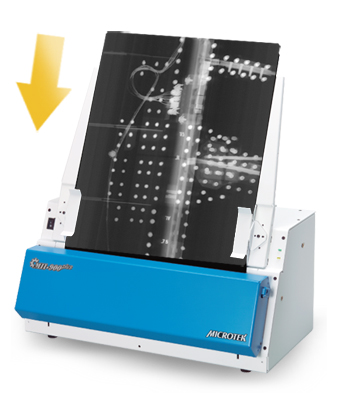
Patented smart auto-scan function
XT6060 is equipped with Microtek’s patented Auto-Scan function, which enables the scanner to scan automatically when detecting materials placed on the top, enhancing the efficiency of continuous scanning process.
.jpg)
600 dpi optical resolution and CCD image sensor
XT6060’s 600 dpi optical resolution meets every requirement from users about the clearness toward design drawings. Plus, a CCD image sensor performs much better than what a CIS image sensor can do in depth of field, speed and color presentation.
.jpg)
The fastest A3 flatbed scanner in the world
At 200 dpi, XT6060 needs less than 3 seconds to scan a color picture in A3 size.
.jpg)
Newly improved ScanWizard DI software ( PC Only )
All-in-one control panel offers a host of features and image adjustment controls. Supporting the TWAIN driver, ScanWizard DI also features full document scanning tools and on-screen proofing. Its multi-scanning area and preview option allow you to obtain quick scans in the preview window.
►Save multiple images as a single file
This advanced feature allows users to save multiple scanned images as a single file, depending on the number of the scanned images that are defined for document archival.
►Auto-crop and auto-deskew
The auto-crop function automatically detects the size of the original image, crops the full scan frame to fit the image, and removes unwanted black borders. The auto-deskew function automatically corrects distorted images for proper alignment.
.jpg)
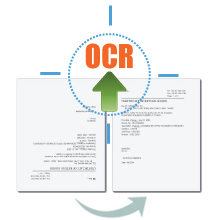
►Auto Document Rotation
With this feature, the scanner automatically rotates every saved files in a readable direction based on a specific OCR language selected.
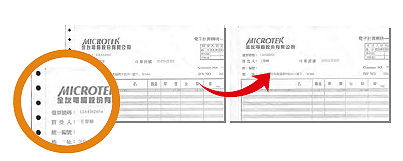
►Remove Punch Hole
With this feature, the software automatically detects the location of punch holes on the scanned documents and fills them in white. This function works for most common hole puncher standards.
►Barcode Separator
This feature allows you to batch scan documents without starting and stopping each time a new file begins by using barcode numbers on the documents. It saves you huge amounts of time and money to organize, to index and to search files of documents in seconds, enhancing the efficiency and productivity of file management.
.jpg)
►Remove Blank Page
With this feature, blank pages are automatically detected and removed by the software when scanning a stack of documents. This function is quite helpful especially when users are scanning double-sided documents and some of the pages only have text on the front side.
.jpg)
►Smart Document Enhancement
With this feature, the scanner automatically brings out and improves readability of text and removes unwanted background color (i.e., green, red, or blue) in/from a document that includes multi image elements.
.jpg)
►Paper count
The paper count allows user to keep track of all scan actions from both flatbed and ADF. This feature helps to estimate when you may need to replace the rubber or separation pad, or to apply maintenance and service to your scanner, making the use of your scanner more effectively.

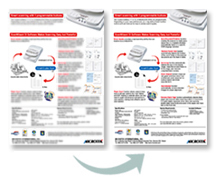
►Document Enhancement
This feature brings out and improves the readability of text in a document that includes other elements such as color, pictures, or graphs.
Tailor-made Scanning Software for Mac System
ScanPotter scanning software, exclusively designed for Mac OS. More Details about ScanPotter
►OCR images into texts
The printed texts can be transferred into digital data easily and fast, saving a lot of time from entering texts manually and improving usages of images.
►Scan and Auto-crop Multiple Images
With this feature, the scanner is able to crop and extract multiple images in just one scan automatically, saving extra time from document scanning and image cropping.
►Auto-crop and auto-deskew
The auto-crop function automatically detects the size of the original image, crops the full scan frame to fit the image, and removes unwanted black borders. The auto-deskew function automatically corrects distorted images for proper alignment.
►Online Update
When detecting the latest version through the Internet, ScanPotter will automatically remind users to download the update.
Specifications
| Item | Details |
| Product Name | XT6060 |
| Scanner Type | Flatbed color document scanner |
| Image Sensor Type | CCD |
| Resolution | 600 dpi |
| Light Source | LED |
| Memory Size | 32MB SDRAM |
| Scanning Area | 12" x 17" (305 x 431.8 mm) |
| Scanning Speed | Color: 3 sec @ 200 dpi, A3 / 20 ppm; Gray: 3 sec @ 200 dpi, A3 / 20 ppm |
| Bit Depth | 8 bit / 24 bit |
| Paper Size | A3 |
| Connectivity | Hi-Speed USB (USB 2.0) |
| Drivers | TWAIN |
| Smart-Touch Buttons | One scan button (Auto document detect and scan) |
| Scanable Media Types | Reflective |
| Supported File Types | BMP、JPEG、PDF、TIFF、PDF/TIFF-Multiple Pages |
| Environmental Compliance | WEEE, RoHS, EuP |
| OS Support | Windows 7/8/10/11(ScanWizard DI) ; OS X 10.10 - macOS 10.14 (ScanPotter) ; macOS 10.15 or later (ScanPotter 2) |
| Dimensions (L x W x H) | 24.7" x 14.8" x 5.1" / 627.4 x 375.9 x 129.5 mm |
| Weight | 20.9 lbs (9.5 kg) |
| Certifications | CE, FCC, BSMI, CCC, C-Tick, VCCI |
| Power Source | DC 15V, 2.5A |
| Power Consumption | 38 Watts |
| System Requirements PC | CD-ROM drive (for installing software) Color display with 24-bit color output capability 512 MB RAM or more Pentium IV PC or higher with USB 2.0 port Microsoft Windows 7/8/10/11 |
| System Requirements for Mac | MacBook introduced in 2009 or later, plus MacBook (13-inch, Aluminum, Late 2008) MacBook Air introduced in late 2008 or later MacBook Pro introduced in mid 2007 or later Mac mini introduced in early 2009 or later iMac introduced in mid 2007 or later Mac Pro introduced in early 2008 or later |
| Software Included | Microtek ScanWizard DI Microtek ScanPotter(Mac) Microtek DocWizard Adobe Acrobat Reader |
| Accessories | Scanner unit Hi-Speed USB cable (USB 2.0) Power adaptor Software CD (s) User’s manual (s) |
*Product specifications described herein are subject to change without notice.
Features List
High-Speed A3 Scanning Performance:Captures oversized A3 documents or graphics in under 3 seconds at 200 dpi, providing rapid data throughput for both full-color and grayscale workloads.
Professional CCD Image Sensor:Built with a high-sensitivity color linear CCD sensor that delivers a true 600 dpi optical resolution. It offers superior depth of field, richer color representation, and sharper text clarity compared to standard CIS sensors.
Patented Smart Auto-Scan Function:Features an intelligent built-in paper detection sensor. The scanner automatically triggers a scan cycle the moment a document is placed on the glass bed, eliminating repetitive manual computer clicks and optimizing continuous bulk workflows.
Instant-On, Warm-Up Free LED Light Source:Utilizes an energy-efficient LED system that delivers stable and uniform illumination immediately upon power-up, cutting out lag times and protecting delicate media from excessive thermal heat.
Advanced Document Processing Engine:Bundled with specialized ScanWizard DI (PC) and ScanPotter (Mac) suites, offering robust automated features like intelligent auto-crop, auto-deskew, blank page removal, punch-hole removal, and multi-page PDF compilation.
Applications / Use Cases
Architecture, Engineering & Construction (AEC):Perfect for engineering offices to quickly digitize, archive, and clear up large architectural blueprints, mechanical CAD drafts, and structural layout drawings.
Art Studios & Graphic Design Agencies:Ideal for scanning oversized physical graphics, large color sketches, context sheets, and magazine layouts with accurate color reproduction and depth.
Publishing Houses & Mass Media Digitalization:Tailored for media firms and publishing companies to efficiently scan large book registers, newspapers, and tabloid-size spreads without data loss along the outer edges.
Corporate & Civil Administration Records:Used by government bureaus, law firms, and administrative centers to rapidly convert continuous stacks of legal ledgers, financial binders, and multi-page A3 forms into structured, text-searchable digital vaults.