
高速平板掃描機
XT7000 HS


- Full Detail
- Specifications
- Features List
- Applications / Use Cases
- Download Brochure
XT7000 HS
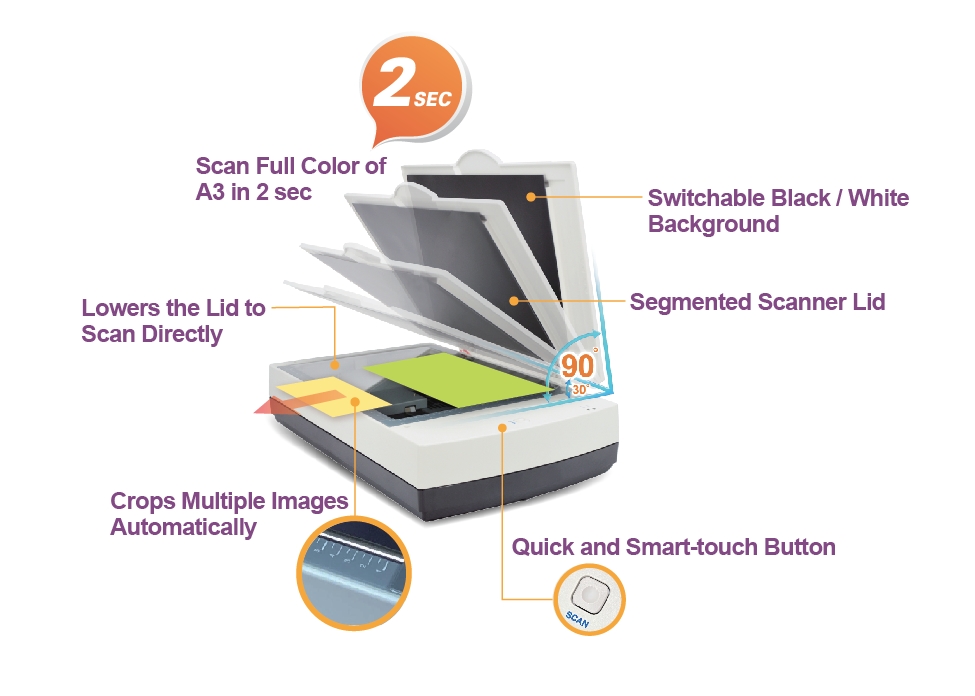
Lowers the Lid to Scan Directly
Equipped with a scanner lid detection sensor, the XT7000 HS can start a scan automatically once the scanner lid is closed and detected by the sensor. You can perform scan jobs easily without pressing any buttons or repeatedly clicking the mouse.
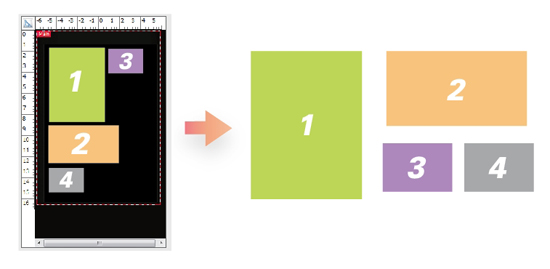
Crops Multiple Images Automatically
With this feature, the scanner is able to crop and extract multiple images in just one scan automatically, saving extra time from document scanning and image cropping.
Scan Full Color of A3 in 2 sec
The XT7000 HS takes only 2 seconds to scan a full page of A3-size document at 300 dpi. The scanning speed remains the same, no matter the color mode is set up as color, grayscale or B&W, generating constant work efficiency.
No Break Platform
The design of no-break platform ensures the scan bed to be absolutely flat; therefore, no marks will be left on the oversized document once the lid is closed. Also, it is easy for you to slide the scanned document out from the scan bed and makes a book easier to lie flat on the scan bed, decreasing happenings of blurry images closed to the inner margin of a book.
Switchable Black / White Background
With the use of the black background for scanning documents, the scanner can perform automatic image cropping to fit the original size of the image and correct the skewed image during scanning. With the use of the white background, the scanner can ensure a clear background for the thin translucent paper and thus enhance OCR accuracy.
Segmented Scanner Lid
The scanner lid is equipped with an assistant hinge, enabling you to lift the lid and stop at an angle position from 30 to 90 degrees. The design is helpful to release the fatigue value of users for they do not have to repeat the actions of opening or closing the lid when scanning large volumes of originals, enhancing the work efficiency and extending service life of the scanner at the same time.
Quick and Smart-touch Button
The scanner comes with a smart-touch button “Scan” which provides you a quick and easy way to launch a scanning function that can be defined through the ScanWizard DI, including scanning to a file, scanning to print, scanning to OCR, or scanning to email. All you need to do is simply to press “Scan” button.
Dust Proof Design
Implemented with a dust proof design to connectors and the top cover, the scanner inside can be protected effectively from tiny dust and sundries and thus is able to maintain a clean environment for image capturing.
Powerful scanning software
Advanced ScanWizard DI offers a host of smart functions and image adjustment controls for scanning. DocWizard is ideal for managing scanned files, it allows you to easily delete, insert, replace, sort, merge, split, and classify files, making file management more efficient.
Specifications
| Item | Details |
| Product Name | XT7000 HS |
| Scanner Type | A3 flatbed scanner |
| Image Sensor Type | CCD |
| Resolution | 600 dpi |
| Light Source | LED |
| Memory Size | 1GB SDRAM |
| Scanning Mode | Color / Grayscale / B&W |
| Scanning Area | Maximum: 12" x 17" (304.8mm x 431.8mm) Minimum: 0.5" x 0.5" (12.7mm x 12.7mm) |
| Scanning Speed | 2 sec@300 dpi, A3(color) |
| Bit Depth | 48-bit (input) /24-bit (output) |
| Connectivity | USB 3.0 |
| Drivers | TWAIN |
| Supported File Types | BMP、JPEG、PDF、TIFF、PDF/TIFF-Multiple Pages |
| OS Support | Windows 7/ 8 /10/11 |
| Dimensions (L x W x H) | 24" x 16.4" x 5.9" (610 x 417.5 x 150 mm) |
| Weight | 23.6 lbs (10.7 kg) |
| Environment | Operating Temperature: 41°F to 104°F (5°C to 40°C) Relative humidity: 20% to 85% |
| Power Source | AC 100V to 240V, 50 - 60 Hz (Input) DC 24V, 2.5 A (Output) |
| System Requirements PC | DVD-ROM drive Color display with 24-bit output capability 1GB RAM or more (2GB is recommended) Intel Core i3 processor PC or higher with a built-in USB port |
| Software Included | Microtek ScanWizard DI Microtek DocWizard Adobe Acrobat Reader |
| Accessories | Scanner unit Hi-Speed USB cable(USB 2.0) Power adaptor Software CD(s) User’s manual(s) |
*Product specifications described herein are subject to change without notice.
Features List
業界領先的 A3 掃描速度:只需 2 秒即可完成 300 dpi 解析度下 A3 整頁文件的掃描,輕鬆應對繁重的工作量。無論採用全彩、灰階或黑白掃描模式,速度始終如一。
自動合蓋掃描:配備智慧硬體蓋板感應器,可在蓋板放下瞬間自動執行掃描程序。這避免了在批次數位化過程中重複點擊滑鼠和按鍵的操作。
分段式鉸鏈限位蓋板:採用符合人體工學的輔助鉸鏈,使掃描儀蓋板可以保持在 30 度至 90 度之間的任意角度並停止。這種以使用者為中心的設計顯著降低了操作員長時間工作的疲勞感。
無縫「無斷裂」平台:採用完全平坦、連續的玻璃表面。超大尺寸的文件可以順暢滑出,不會卡住,厚重的書籍也能完全平放,大幅減少內頁邊緣的文字模糊。
智慧型自動裁切功能,適用於多件商品批量處理:自動偵測、分開並裁剪同時放置在玻璃平台上的多個小物件(例如收據、照片或身分證),一次即可將它們提取到單獨的檔案中。
黑白背景切換:允許使用者切換背景顏色以優化資料擷取。黑色背景可確保對不規則頁面進行完美的自動校正和裁剪,而白色背景則可消除半透明紙張上的重影,從而最大限度地提高 OCR 文字辨識的準確性。
Applications / Use Cases
大型企業資料歸檔:專為需要快速數位化大量 A3 文件、帳簿和財務憑證的政府機構、稅務機關和跨國銀行而設計。
圖書館及學術書籍數位化:非常適合大學和公共圖書館保存裝訂成冊的文獻、歷史檔案和厚重的參考書,避免書脊受損或內頁模糊。
博物館及藝術品複製:是藝術工作室和文化機構掃描中型油畫、精美書法作品和大型歷史藍圖的理想之選,可實現連續、高保真的色彩還原。
物流及高頻次行政窗口:專為處理大量、不規則批次的貨運清單、收據和活頁申請的中央掃描中心量身訂做。

